Steal a PC Controls
Every critical input—steal, treadmill, Drop, and Settings—explained so misclicks stop ending runs.
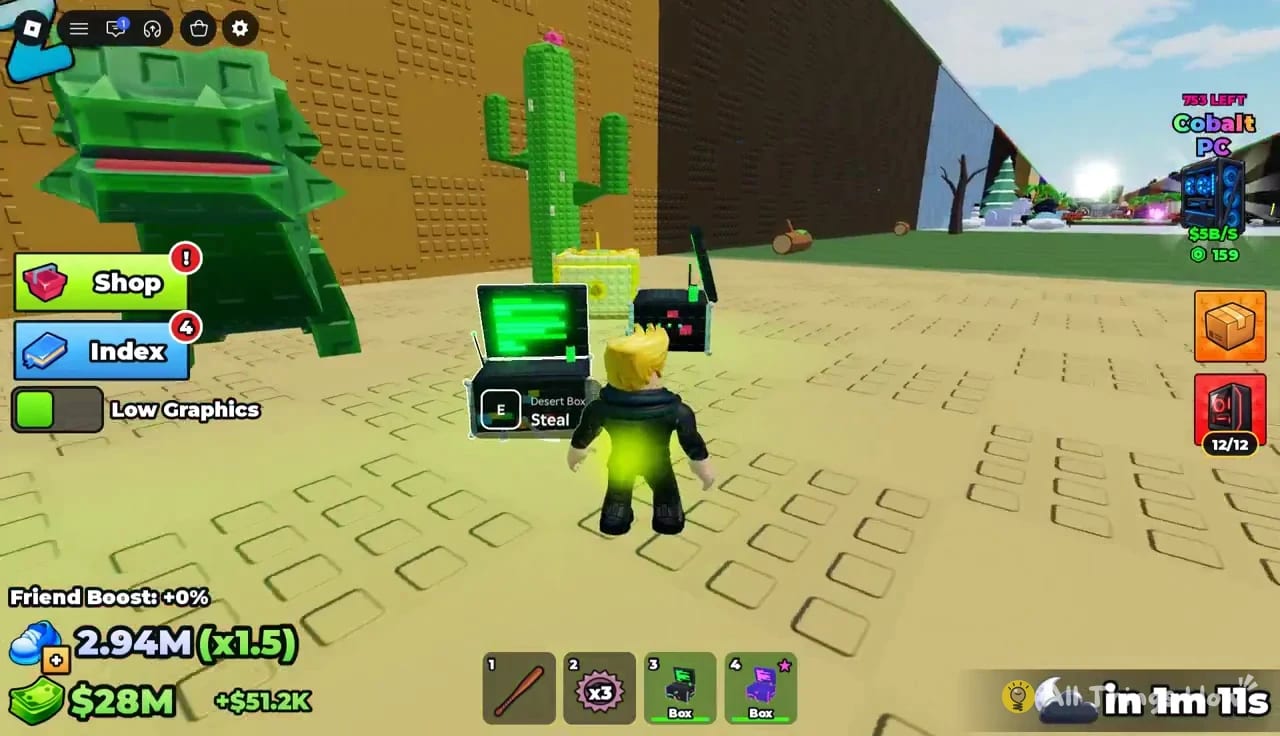
Steal a PC only needs a handful of inputs, but each one is high stakes. Press E a second late and the Guardian walk cycle changes. Tap Drop by accident and a Desert box evaporates. Hold the treadmill without knowing Space and you waste 3MVISITS multipliers. This page is the controls binder for keyboard and mobile players.
Core controls cheat sheet
| Action | Input | When it matters |
|---|---|---|
| Steal box | E | At Zone Guardian prompt |
| Jump / leave treadmill | Space | After Speed training |
| Drop carried box | Drop button | Almost never while fleeing |
| Open Settings / codes | Gear icon (top-left) | After tutorial + first PC placed |
| Move | WASD / thumbstick | Entire chase |
| Camera | Mouse / touch drag | Pre-scout Safe Zone lines |
Roblox shift-lock and mobile sensitivity are account preferences—raise sensitivity until you can turn toward the Safe Zone without oversteering into walls.
E — Steal
Walk into the Zone Guardian box interact range until the steal prompt appears, then press E. Do not mash from across the path; wasted inputs delay the sprint start.
Best practice:
- Arrive with Speed already above the zone gate (Tools).
- Face your escape vector before pressing E.
- Sprint immediately—no inventory tourism mid-aggro.
- Unbox only inside the Safe Zone.
Full routing advice: How to Steal Boxes.
Space — Treadmill exit
The treadmill is how you raise Speed/s between steals. When your training block ends, press Space to jump off cleanly. Players who forget Space either AFK forever or walk off awkwardly into a Guardian with no plan.
Combine treadmill sessions with upgrade breakpoints from Upgrades (Lv2→3 ~$770K, Lv3→4 ~$2M).
Drop — The run killer
Drop exists so you can abandon a doomed carry or free movement. In practice it is the #1 self-inflicted fail.
Avoidance tips:
- On keyboard, keep fingers off the Drop bind while sprinting.
- On mobile, move the Drop control away from your thumb’s natural sprint zone if your executor/UI allows remaps via Roblox settings where available; at minimum, be conscious of on-screen button heat maps.
- Never open extra menus mid-carry.
- If you must Drop intentionally, do it early—not on the Safe Zone paint.
If Drop keeps ending sessions, run ten Grass steals focused only on thumb/finger discipline before returning to Mushroom or Desert.
Gear icon — Settings and codes
Top-left gear opens Settings. After you complete the tutorial and place your first PC, the codes box appears. Paste strings from the Codes Hub and hit Redeem.
Active November 2026 reminders: 3MVISITS, 300KGROUP, 1MVISITS, DISCORDGIFT.
If the box is missing, you are still tutorial-locked or have not placed a PC.
Movement and camera during chases
- Pre-aim camera toward the Safe Zone before E.
- Strafe around other players instead of tunneling through them—six-person lobbies clog doorways.
- On controller, soften dead zones if your stick drifts into Drop-adjacent UI on certain overlays.
Mobile-specific notes
Mobile players succeed in Steal a PC, but button crowding is real. Recommendations:
- Play in landscape.
- Lower extra HUD clutter where Roblox allows.
- Practice E timing in Grass until muscle memory ignores the Drop region.
- Consider a quieter server for learning deeper zones.
Scripts listed on the Scripts Hub are PC-executor oriented; mobile automation is a different (still ban-risky) world.
Controls checklist before a serious session
- Confirm Drop will not be fat-fingered.
- Know your Space exit from treadmill.
- Redeem codes via gear Settings.
- Equip trail (Trails Guide).
- Verify zone Speed.
- Scout path once without loot.
- Press E only when escape is clear.
Training drills
Drill A — Drop immunity: 10 Grass carries; success = zero Drops. Drill B — Treadmill pop-out: train 30 seconds, Space, steal immediately. Drill C — Contested door: practice arcing into Safe Zone with a friend blocking the center.
Related pages
Master the small control set and your “lag” problems often disappear. Most lost boxes are input problems wearing a latency costume.
Frequently Asked Questions
Quick answers to the most common Steal a PC questions.
What button steals boxes in Steal a PC?
Press E when the Zone Guardian box prompt appears, then sprint to the Safe Zone.
How do I get off the treadmill?
Press Space to jump off after a Speed training block, then start your steal run.
Why should I avoid Drop?
Drop abandons the carried box. Accidental presses are the most common self-made failed steal.
Where do I enter codes?
Tap the gear icon in the top-left, open Settings, paste the code, and press Redeem after tutorial completion and first PC placement.
Are controls different on mobile?
Same actions with on-screen buttons. Play landscape and practice so Drop sits outside your sprint thumb path.